Tuesday, November 11, 2014

Creative Apps for Teaching

As the years go by in teaching, I'm finding myself being more of an entertainer than I ever was before. The students entering elementary school these days, are digital natives, and used to instant access. A song and dance helps to keep their attention.
I'm looking at the Sock Puppets app, suggested by one of my students, and at the TouchCast app, which was a discovery I made at the Fall CUE conference, as ways of presenting info in new and exciting ways.
Sock Puppets is a one-take, 90 second movie. The time constraint might be good in that I'd like to get my point across quickly. To save a sock puppet movie, I save to camera roll, and then to YouTube. 
TouchCast I'm still working with, but the idea of the student interacting with the video is super fascinating to me. 
I'm pretty happy about the prospects for the applications for both apps, in my classroom!


Sunday, November 9, 2014

An Aha Moment Today

The tremendous task of preparing lesson plans for two grade levels (for my fourth and fifth grade combo class) presented itself again this weekend. Both groups have assessments in math, that have not been seen or created before. Today I created them, both for units 2, and study guide movies to match the unit summative assessments. Wow! What a task!
But in there somewhere today was a pretty cool moment when I saw a light shine,dare it be a ray of sunshine and light...a lightbulb going on over (or in) my head? 
I found premade test questions, the new way of writing them (I'm talking common core here). Then I copy and pasted...well, not exactly that, I transferred from an online site with questions, directly to the Notability app, and placed into one file, individual math questions matching the common core state standards, CCSS, addressed in the units I taught.
A test was miraculously compiled, and besides being saved on/in Notability, I sent the creation to Edmodo. The test will appear on Thursday morning for the students, since there is a scheduling feature on Edmodo.  I'm having my fifth graders save the test in their Notability apps, annotate (that means to write) on top of the test, and send the completed tests back to me, turned in on Showbie. Ahhhhh, well that just makes sense! No paper this time, people! 

Saturday, November 1, 2014

Fun at the CUE

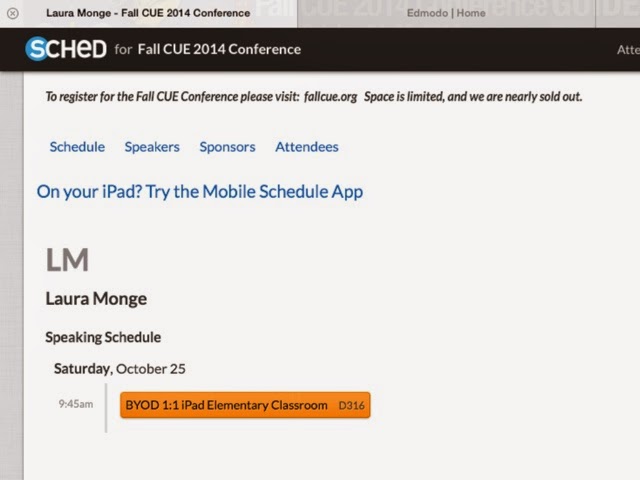
Last weekend I spoke at the Computer Using Educators (CUE) Conference in Napa about starting a "BYOD 1:1 IPad Elementary Classroom". I made an iMovie trailer for the apps I like to use in our BYOD class, to introduce and talk about each app. It also gave a good glimpse of the versatility of the iMovie app. 

I spoke about PlanBook.com which has been the greatest discovery for me! http://youtu.be/jEBlbFMLRns

Here is the Edmodo trailer I made to introduce talking about it:http://youtu.be/VrL1NgIp5G4

The educreations app is great for creativity:http://youtu.be/67U42n1czE0

Notability is so versatile for writing and annotating all assignments:http://youtu.be/NC3RFOo9Nmk

Showbie is great for turning in all assignments online. I can give direct feedback:http://youtu.be/GMgL90neEjA

It was a fun weekend for me, not just because of the sharing at CUE, but also because of the learning! I learned about TouchCast which is a free app on the iPad, for making movies, inserting webpages and polls. It is an interactive movie application. Wow! I was reminded of Minecraft, and all the fantastic endless possibilities there. Coding discussions included Tynker and Khanacademy, and so much more. I was very impressed with all the sessions I attended at CUE!

Saturday, October 18, 2014

Sharing and Collaborating with other Teachers!

I, in general, freely share what I'm doing in class with other teachers, usually via Edmodo or email.
 With the change in education toward the common core, CCSS, and the change in design of how and what we focus on to teach, it is a time of transition. 
When I share my lesson plans (PlanBook.com plans) with others, and Educreations math movies, I don't hear back much about that "free" sharing, and feel sometimes like I could/should stop. Do others really want the info? Then a thing happens, and I'm brought back to the realization that it is the best thing to do!
I was cornered by a teacher from another school this week, who said there was a very difficult new math lesson for fifth graders, that the teachers were stumped about at their school. Then the group of teachers watched my movie of explanation, that I made to show my fifth graders after they tried the difficult word problem, and the lesson was made more clear to that group. The teacher told me that they showed the movie to their fifth grade classes.
So, to share freely, or not to share? For sure I'm going to continue putting my answers out there. 
It's cool too, to see something I need on that Edmodo site, that helps with my instruction! I found a fifth grade assessment that another teacher in the district painstakingly created, and I used it with my class, and thanked her! 
In such a hard transitional phase of time in education, and interesting too, the time to share is now! Cool how the technology helps us to collaborate more readily!

Saturday, September 27, 2014

I Wasn't There, but I Was There!

I had a sub for a week, and what was awesome was how well it went in my classroom without me there! The substitute wrote me an email on Monday saying "thank you for being so organized" and commenting how nicely day 1 had unfolded.
So, what I did to get ready, was to do what I do every week. I made a daily plan of each hour, and each subject, for two different grade levels (4th and 5th grades; I teach a combo class) in the PlanBook.com site. Then on Sunday nights, before the week starts, I post these lesson plans, and homework plans, on Edmodo. The plans are on our class Edmodo page, for students and parents to see. Students bring their iPads to school from home (it's a pilot BYOD 1:1 iPad program) and they see at a glance, and in detail, what the plan is for the week. (I made a paper copy of plans for the sub, with a letter to her about how to store iPads at recesses, and other logistical matters.)
In some subjects, like math, students can watch my explanation of math concepts, take notes, and do math journal pages to match. They plug in their earbuds, and pause the tape, work on math problems, and push play to see the answer and explanation of how to solve.
For subjects like social studies, science, and writing, students use the Notability app to write their assignments, and email those assignments to me.
So, during the week when I wasn't at school, I was able to grade work emailed to me, give feedback, and record grades in the Edmodo gradebook. Students could see their scores on assignments immediately. 
On Edmodo I was asked some questions about logistics, like about music instruments for music class, and was able to answer in real time. Students shared how they did on STEM activities in class, and truly communication continued, even though I wasn't there.
Now, as fancy as the plans were, the iPads are, and the students being on-task, there needed to be a willing and more than competent teacher there in my place. The stars all aligned, and the substitute was talented and capable. A parent wrote to me, at the end of the week, "My son said the sub was great! It sounded like it went really smoothly and they really liked her!" So there was that. The key piece in this puzzle, besides the iPads, was the person left in charge, who needed to be open to this type of learning environment. I'm positive she was confident in such a situation.
How cool to live in a time where utilizing the technology in a classroom, can keep instruction running smoothly. Students knew I was watching, they cared about their work, and posts on Edmodo. They listened to the sub, and enjoyed her, and their week! Learning went on! Creations were forwarded! It was incredible!


Thursday, September 18, 2014

Cue Napa Monge

Yeah, I'm going to the CUE (Computer Using Educators) conference, in Napa, CA, in October! So excited to be a speaker again! Woo hoo! The name of my session is "BYOD 1:1 iPad Elementary Classroom"! As time goes on, I have so much more to add and share. On the road again soon to Napa! :)

Thursday, September 11, 2014

The Edmodo Gradebook!

New discovery...The Edmodo Gradebook feature on Edmodo!
I used to grade papers, keep them in a stack, set them next to the computer in my classroom, and slowly record the grades from each paper into an old computer program. So, basically I looked at each paper twice, which is fine, unless you do the math, and multiply how many minutes that took to do twice.
Now I have the gradebook on the go, using the Edmodo gradebook, that I have with me on my iPad. As I grade papers I enter them immediately into the gradebook. Although I made a seperate page on Edmodo for each subject, so that each set of grades is separated, and because I'm teaching two different sets of students (4th and 5th graders), the convenience of using the feature, outweighs having to switch pages on Edmodo to do so (which is easy). Students can see results of their work, by seeing the gradebook too. 
My idea of sharing lesson plans with students, so they can see our plan for the week, on PlanBook.com, has worked out very well, so I'm extending that concept by showing their grades as they do the work. It's an exciting time in education, and the technology piece is awesome!